WebSocket Fallback: Reliable Communication When WebRTC Fails
Real-time collaboration is at the heart of Edrys-Lite, but what happens when network conditions prevent the ideal technology from working? Our WebSocket fallback solution ensures that classrooms remain connected even in the most restrictive network environments.
The WebRTC Challenge
By default, Edrys-Lite uses WebRTC for peer-to-peer communication. WebRTC is excellent - it offers low latency, direct browser-to-browser connections, and efficient media streaming. But it has an Achilles heel: network restrictions.
In many educational institutions, corporate environments, or regions with strict internet policies, firewalls and NAT (Network Address Translation) configurations can block WebRTC connections. When this happens, students and teachers simply can’t connect to each other, making remote labs impossible.
This is a real problem. Education shouldn’t be blocked by network infrastructure.
The WebSocket Solution
To ensure Edrys-Lite works everywhere, we’ve implemented WebSocket-based communication as a fallback option. While WebRTC connects browsers directly to each other, WebSockets route all communication through a central server - a configuration that works even in restrictive network environments.
Think of it this way:
- WebRTC: Like a phone call - direct connection, lower latency, but requires open network paths
- WebSocket: Like email through a server - slightly higher latency, but works behind almost any firewall
Switching Communication Protocols
Changing from WebRTC to WebSocket is simple. In your classroom settings, just select the WebSocket option from the communication protocol dropdown. The change is immediate - no complex configuration, no server setup required (we provide default servers).
Once switched, your classroom URL updates to reflect the new protocol, ensuring all participants connect using the same method. Everyone stays synchronized, just through a different technical path.
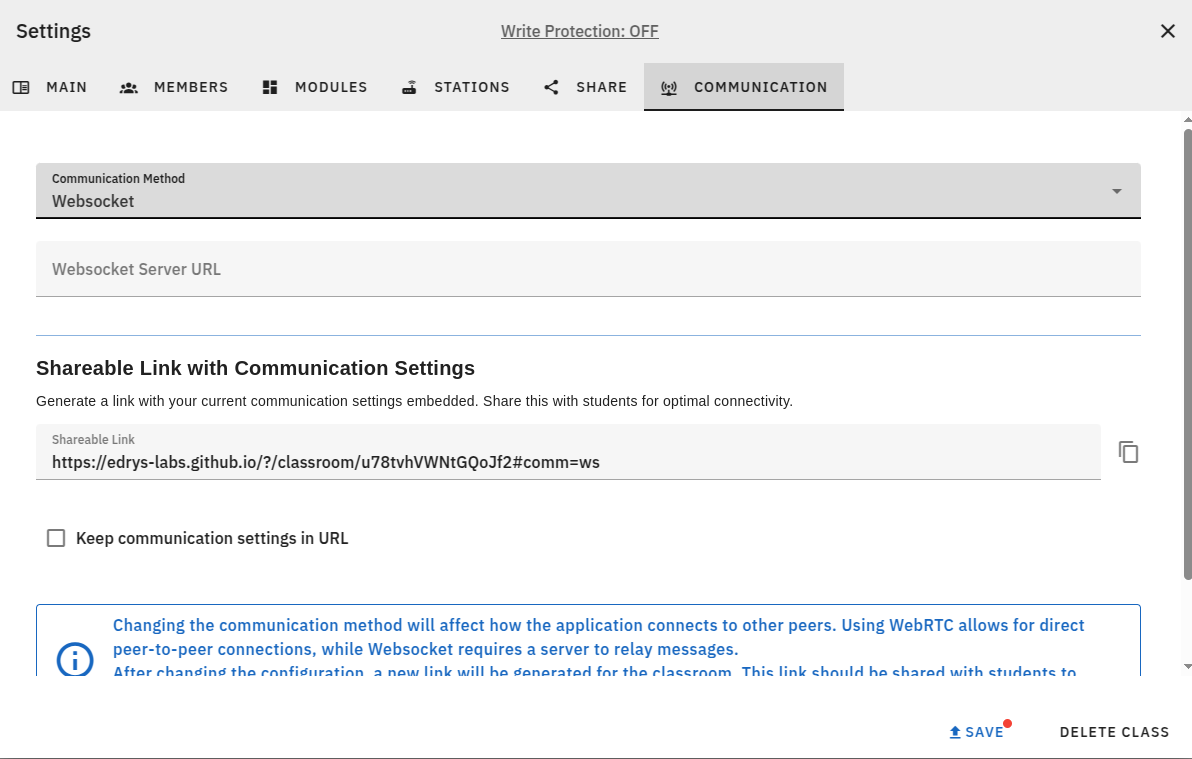
Switching to WebSocket communication in classroom settings
When to Use WebSocket Mode
WebSocket fallback is perfect for:
- Strict firewalls - Corporate or institutional networks that block peer-to-peer connections
- Symmetric NATs - Network configurations that prevent direct WebRTC connections
- Mobile networks - Some cellular providers restrict WebRTC traffic
- Reliability-critical sessions - When you absolutely need connectivity to work, regardless of network conditions
- Geographic restrictions - Regions where WebRTC may be throttled or blocked
If your students report connection issues, or if you’re teaching in an environment with strict network policies, WebSocket mode is your solution.
Customizable Server Configuration
For both protocols, Edrys-Lite offers flexibility:
- WebRTC mode: Configure your signaling server URL if you want to host your own infrastructure
- WebSocket mode: Specify your WebSocket server URL for complete control
Don’t want to manage servers? No problem. Edrys-Lite provides default servers for both modes, so switching protocols is as simple as clicking a button.
Best of Both Worlds
Most educators will stick with WebRTC - it’s faster and more efficient when networks permit. But knowing WebSocket fallback exists provides peace of mind.
You can start a semester with WebRTC, and if connection issues arise, switch to WebSocket mid-course without disrupting your teaching. Students just need to rejoin with the new classroom URL.
This flexibility transforms Edrys-Lite from “works in most networks” to “works everywhere.”
Technical Details for the Curious
For those interested in the implementation:
- The WebSocket server acts as a message relay between clients
- State synchronization works identically in both modes
- Stream quality may vary based on server capacity and network conditions
- Security and encryption remain consistent across both protocols
We maintain open-source WebSocket server code for institutions wanting to host their own infrastructure.
Accessibility Without Compromise
The WebSocket fallback isn’t just a technical feature - it’s an accessibility feature. It ensures that:
- Students in developing regions with limited infrastructure can participate
- Schools with tight IT policies can still use remote labs
- Mobile-only learners aren’t excluded
- Geographic diversity doesn’t create technical barriers
Education should be universally accessible. WebSocket fallback helps make that reality.
Ready to ensure your classroom works everywhere? Try WebSocket mode and eliminate connectivity barriers!
Explore Edrys-Lite: edrys-labs.github.io
Copyright: Attribution-NonCommercial-ShareAlike 4.0 International (CC BY-NC-SA 4.0)
Author: Jihad Hyadi, Github Copilot
Posted on: November 11, 2025